
HELLO, I'M KINDLY.Your emails.
Your emails.
A little lighter.
Read, write, find again.
Let me show you your new inbox.
N@il – a free email client for Windows
Emails, appointments, tasks and projects.
Everything together. And finally room for
what makes your day special.
For Windows · free for personal & business use
6 display languages · local spell checking
MORE POSSIBILITIES. LESS BACK AND FORTH.
Personal, professional or shared with your team: the unified mailbox view brings your incoming mail together. Favourites, coloured folders and multiple categories let you organise it your way.
Microsoft 365, IMAP/SMTP and JMAP. Shared Microsoft 365 mailboxes can be connected with the appropriate access permissions.
One unified local search finds messages, attachment names, already indexed file content and your private notes. Choose a mailbox or search across all of them.
Search does not download files automatically. Find content that has not yet been indexed by its filename.
Bring emails from PST, EML, MBOX, MSG or Maildir. N@il can also import appointments, contacts and tasks from supported PST files as local copies.
Folders and their roles are mapped before import. The summary shows imported content, duplicates and skipped entries; the original file is preserved and can be exported.
ANSI and Unicode PST are supported; OST is not. Appointment series that cannot be transferred and ambiguous all-day times are skipped. Recurring tasks are imported as a saved snapshot with a notice. Extra Outlook fields and distribution lists remain in the original; this is not a complete Outlook migration.
FAMILIAR. JUST A LITTLE NICER.
Clear views, gentle colours and everything where you expect it.
Take a look at your new workspace.
Try it: the icons on the left of the app image are clickable, too.
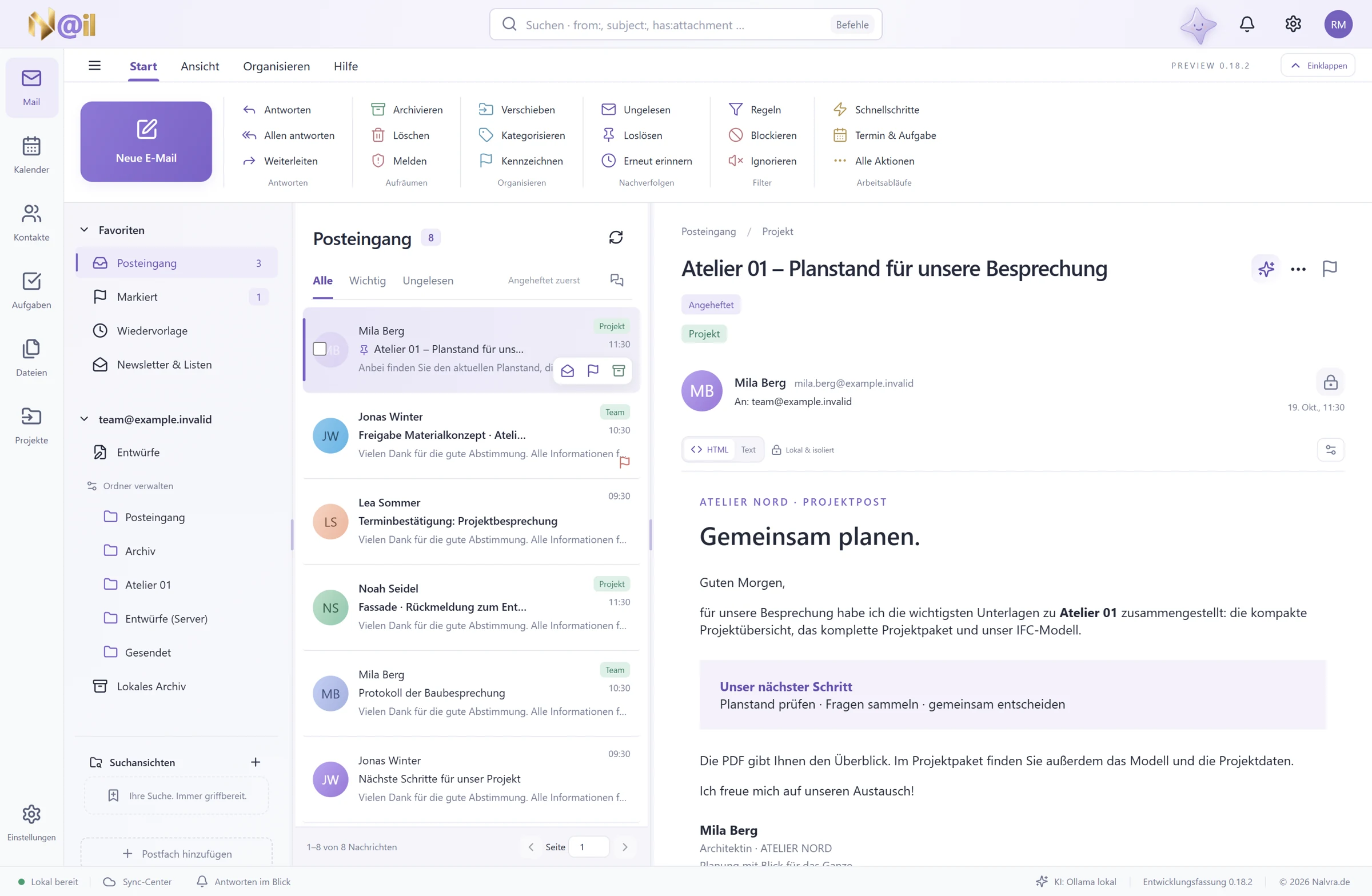
Your mail. Well organised. With familiar folders, search and a reading pane that suits you.
App previews · version 0.18.2 · sample dataRIGHT AT THE EMAIL. WITH A RIGHT-CLICK.
Sometimes your next step is already in your inbox. N@il puts the right actions right where you need them.
Original menus from N@il 0.18.2 · fictional sample email
LESS SEARCHING. MORE CONTEXT.
For people with a lot on their minds.
Who like to start work with
a clear overview.
Calendars, tasks and contacts belong together. Plan your day, set priorities and capture your next steps.
A local project file for emails, documents, notes and links to tasks, appointments and contacts. Keep the context close at hand.
Private notes right at the message. Follow-up reminders for later. And prepare your next appointment or task from an email.
These little scenes illustrate everyday work. The app views above show the actual interface.
ALREADY A LITTLE AT HOME.
A familiar gesture. A document found again. And the good feeling of deciding for yourself. N@il is here for that, too.
Like the familiar Outlook arrangement? Three Redmond views bring familiar ways together with N@il’s pastel colours. With a ribbon, message table and matching keyboard shortcuts.
The wizard guides you through layout, shortcuts, reading pane and composing. Review the preview and apply your choices deliberately. You can also restore the previous view.
Local results are there straight away. And if an email is not yet on your computer, deliberately search your Microsoft 365 or IMAP provider. Even in headers-only mode.
Only your click sends the displayed search text to the selected providers. Private notes stay local. Search limits are shown; the separate Exchange Online archive is not included.
Save frequently used local search conditions as a search view, too. Your next overview is then just one click away.
Add a separate Nextcloud plan alongside your local backup. N@il encrypts the backup, verifies the cloud copy and follows your retention rules.
Choose a connected Nextcloud, a writable folder and a separate backup password. Automatic runs require the app to be running and connected. Local and cloud plans remain separate.
Backups contain locally available content. For a complete collection, missing message bodies and attachments must be downloaded first.
Little scenes, useful everyday help. These illustrations explain workflows; original app views are shown above.
SMALL SHORTCUTS TO A GOOD DAY.
Some things only stand out when they suddenly become easier. Open the topics that make your day lighter.
Open several messages in separate tabs, pin important ones and reply directly in the reading pane. Continue with the same draft in the full editor.
If you wish, N@il resumes your last view the next time it starts. You enable this option yourself in settings.
Prepare an email now and schedule it for later. An adjustable send delay gives you time to cancel before sending. If no reply arrives, a personal reminder helps.
N@il must be running and the mailbox connected for scheduled sending. The undo window does not recall emails from recipients after they have been sent.
Clean up messages from a sender together and review the changes first. Rules also organise existing local emails; recurring actions can be grouped into quick steps.
Newsletters & Lists brings recognised mailing lists together. You deliberately choose cleanup actions and available unsubscribe options.
Add files from connected cloud services as ordinary email attachments. Save selected attachments together in a cloud folder or share open files deliberately.
The choice between a file copy and a sharing link stays yours. Review the destination and scope before uploading; links require the appropriate provider permissions. Services such as OneDrive, Google Drive, Dropbox and WebDAV can be connected depending on your setup.
Keep your daily agenda and tasks together in the calendar. An optional second time zone helps with international planning. Merge possible duplicate contacts locally after reviewing a preview.
Microsoft 365 calendars, contacts and To Do, as well as CalDAV/CardDAV and Mailcow/SOGo, can be connected within their supported scope. Teams appointments use suitable Microsoft business calendars. Features and sharing depend on your account and server.
HTML signatures retain their passive layout with tables and image sizes. Edit text and links, use snippets or find and replace directly in the HTML and plain-text editors.
Even if you cancel a file or image selection, your draft stays open with its text, recipients and existing attachments.
The local MCP server connects N@il functions to compatible assistants and tools. The interface and MCP use the same functional core.
The server starts in read-only mode by default. Write access is enabled separately; sensitive actions such as sending require additional confirmation. Setup takes place locally.
Daily, weekly, monthly or yearly: personal tasks can repeat. Confirming completion advances the next due date; the history stays understandable. Dismiss or snooze reminders.
Kindly can prepare appointment suggestions from a locally available email. Edit the suggestion, review it and explicitly create a local appointment. This does not automatically send an invitation or change a provider calendar.
Local recurrence and reminders apply to personal tasks. Microsoft To Do recurrence and provider reminders have their own rules; AI requires a configured connection.
Manage supported rules and automatic replies directly in Microsoft 365 or through ManageSieve. N@il shows the proposed change before you confirm it, so you know what should apply at your provider.
Available features depend on the server, account and permissions. Microsoft may require additional consent; ManageSieve needs a suitable server connection. Local and server rules remain distinct.
Search your company directory for people and mail distribution groups. For Microsoft appointments, the room finder helps with building, capacity and free/busy times. Manage calendar sharing and roles within the supported scope.
These tools require a suitable Microsoft business account, appropriate directory data and additional permissions. Group members are not automatically expanded into a local recipient list.
Use local Windows OCR to recognise text in suitable image and PDF attachments and add it to the search index. Words in scanned documents can then be found again, too.
OCR is started deliberately and requires locally available files. Language packs, image quality, format and size limits affect results; recognition is not guaranteed to be error-free.
Share a contact as a QR code or read contact codes from PNG, JPEG and WebP images. N@il shows the contact details for review before you import them. Everything is processed locally.
Personal extra fields such as notes are left out by default when sharing. This is not a camera scanner and does not automatically open arbitrary QR links.
Check your draft for missing image descriptions, unclear link text, heading order and table headers. Choose suitable corrections deliberately. A little writing help, not accessibility certification.
And when an existing email is a good starting point, “Edit as a new email” creates an independent draft after preview, preserving its content and available attachments. The source stays intact; choose recipients deliberately.
Action history shows supported email changes and their status. Before an available undo, see exactly which value would change. Later, independent changes stay intact.
Server operations that have already started or have an uncertain outcome can prevent undo. History does not recall a delivered email.
ONE ATTACHMENT. MANY POSSIBILITIES.
Read a PDF. Browse a project archive. Explore an IFC model from every angle. The Focus Viewer brings suitable views directly into N@il. Compare confirmed file versions in your project file selectively.
View all 232 file extensions ↓Read-only previews with suitable tools. The available view depends on the format; original files stay unchanged.
MANY FORMATS. ONE FAMILIAR PLACE.
Find all 232 supported file extensions here.
With the appropriate view and its capabilities.
Checked against the format catalogue in source version 1.2.9.
Read documents. View images.
No script execution. Password-protected PDFs require the file password.
Codec variants are checked when opening.
Sanitised display without external resources.
Extracted text content and slide text. Container access to images and embedded files. No faithful layout view or macro execution.
Values, structures and connections.
Table view with delimiter selection, search and sorting.
Saved cell values; no formula calculation, macros or faithful layout view.
Limited table excerpts; codec support is checked.
Simple numeric arrays, endianness and memory order. Up to 10,000 values. No object/pickle execution.
Tree view, source code and selective comparison.
Structure view. No automatic 3D or schema validation; no external entities.
From drawing to spatial model.
Geometry, component identifiers and properties; schema and rendering losses are reported.
Open the archive and view the contained IFC model selectively.
Container inventory, topic XML, images and viewpoint XML; no automatic camera reconstruction.
Model preview from the CAD exchange format. No CAD editing.
Existing display meshes; missing meshes are not presented as complete geometry.
Companion files must be present in the selected file set.
2D geometry. Special objects that cannot be displayed are listed; no DWG reader.
Limited point view; depends on format and compression variant.
Keep an overview inside packages, too.
Limited, read-only browsing. Encryption and compression variants are checked.
Open contained chapters and files. No faithful book layout; no access to DRM-protected content.
Open the archive; view contained KML files and other content individually.
Archive view; open individual arrays.
Read the message and attachments; no external images or active links.
Listen. Watch. Think ahead.
Availability depends on the actual codec.
The container name does not guarantee codec support.
Specialist content with an appropriate view.
Coordinates and properties. No automatic access to map servers.
Bill of quantities and original structure; no bid editing.
Limited RS-274X geometry view. No complete manufacturing validation.
Read and understand. Without execution.
Read-only text, search and line navigation.
Read-only source view. Code, scripts and macros are not executed.
A look inside as source text.
Source text is not a complete schematic or PCB renderer.
Source text display; no machine control or complete dialect simulation.
Source text view; viewing does not import data automatically.
Source text display; not a qualified drill plan renderer.
This file type is not included in the supported Focus views. Try another extension or a term such as “images”.
“Supported” refers to the view described for each format. Format version, file size, codec and required companion files may limit rendering. Office files show text or saved cell values; no faithful Office editing. Original files stay unchanged.
LITTLE STAR. LOTS OF HEART.
We think so. That's why there's Kindly. Our little star brings a little warmth to the interface — and keeps you company while you explore here, too.
Gentle colours, thoughtful details and calm controls. Because a tool you use every day deserves to feel good, too.
A GOOD FEELING NEEDS TRUST.
Previously downloaded messages and attachments, along with local planning, remain available. Your next idea does not always need a connection.
Edit selected text, review a suggestion and choose what to use. Local models are possible; cloud features require your permission and setup.
Optional profile encryption and encrypted backups support your local workspace. You decide which features to set up.
Google with browser sign-in, Mailcow with shared service setup. Sign-in, permissions and available features depend on your provider.
A LITTLE STAR. A GOOD TEAM BY YOUR SIDE.
A good start, an answer at the right moment or a considered rollout: choose the support that suits your business.

The app stays free. For businesses, too.All packages are optional additional services. You do not need a service package or a mandatory NALVRA account for normal N@il use.
For businesses and self-employed professionals · all package prices exclude statutory VAT · non-binding enquiry, commissioned after a quotation
Three requests. A direct connection.
49 €per month / company
One ticket covers one related issue. Time and ticket allowances apply per billing month and cannot be carried over. We agree any additional effort with you in advance.
Service hours and contract duration are agreed in the quotation. Fixed response or resolution times and 24/7 emergency support are not included.
Help shape the roadmap: A UserVoice portal for suggestions and voting is being prepared. Until then, we accept your ideas by email and provide feedback. Prioritisation and implementation remain product decisions; a suggestion is not a development commission.
You can report product bugs for free without a package.
One session. Your whole team.
349 €one-off / company
One joint session for your company's employees: around 60 minutes of introduction and 30 minutes of questions. We agree topics and participant numbers beforehand and choose a suitable meeting format within technical capacity.
For large groups, we collect questions together. Additional sessions, individual workstation setups and handling specific IT issues can be agreed separately.
Start with a pilot. Continue with a plan.
from1.490 €one-off / pilot package
Getting started includes up to one remote consulting day of 8 hours for one environment, one deployment method and one pilot workstation. We agree objectives, access and specific outcomes in the quotation beforehand. Wider deployment is a subsequent step agreed separately.
For Microsoft 365, we check required sign-in and administrator permissions, among other things. For Exchange On-Premises, we first establish which protocols and features are usable in your environment. Complete Exchange/Outlook feature parity is not assumed.
Microsoft licences, server changes, full mailbox migrations, additional environments and ongoing operation are not included. If requirements are not met, we agree next steps before incurring additional effort.
More possibilities for good words.
Planned offeringNot yet available.
This is a non-binding preview. Hosting partners, models, privacy documents and the exact scope of service will be announced before launch.
You can already express interest by email. This does not create a booking. N@il remains usable without this package; you can continue setting up your own supported AI connections.
Briefly describe your team and your plans. We'll find a suitable starting point together.
A SMALL DOWNLOAD. A NEW FEELING.
N@il is waiting for your first good working day.
Download for Windows for freeWindows · free for personal & business use · no mandatory NALVRA account
Feature baseline: N@il 1.2.9 · source review on 1 November 2026. Original images show 0.18.2; the PDF brochure describes 0.18.0. The separately provided installer may be a different version.
FREE · ENTIRELY OPTIONAL
N@il updates, new features and roadmap previews — plus NALVRA offers and information about our products and related services. Only if you wish.
ONE MORE LITTLE MOMENT?
N@il is the free Windows email client by NALVRA. It brings together email, calendar, contacts, tasks and local project files. Microsoft 365, IMAP/SMTP and JMAP can be connected within their supported scope. Personal and business use is free; AI and service packages are optional.
Yes. N@il is free for individuals, businesses and self-employed professionals, with no licence fee, subscription or mandatory NALVRA account. The included terms of use apply. Paid email, cloud or AI services that you connect yourself are not included.
No. STAR SUPPORT, KINDLY START and ENTERPRISE START are optional services for businesses. The planned KINDLY AI PACK is optional, too. Normal use of N@il remains free. View the packages →
Download the MSI installer for Windows here. Open the downloaded file and follow the installation wizard.
Yes. From the 1.x version line onwards, we will also deliver N@il for macOS and Linux.
N@il connects Microsoft 365 via Microsoft Graph and other mailboxes via IMAP/SMTP or JMAP. Google supports browser sign-in and Mailcow has shared service setup. Configure additional calendar, contact and task sources to match your provider. Scope and availability depend on sign-in, server and granted permissions.
The Windows wizard helps connect through the original Proton Mail Bridge. Proton sign-in stays in Bridge; N@il uses the local IMAP/SMTP credentials shown there.
A suitable paid Proton plan and a running, signed-in Bridge are required. N@il does not replace Bridge and is not an officially tested Proton client.
Supported PST files can supply emails, appointments, contacts and tasks as local copies. Review folder mapping before import and the summary afterwards. OST and certain specialised Outlook features are not covered. Learn more about importing →
The interface supports German, English, Russian, French, Turkish and Spanish. Local Windows spell checking can use these languages with the corresponding Windows proofing languages installed; up to two at once. Add your own words personally or per mailbox. Display and proofing languages are configured separately.
Normal mail and organisation features do not require AI setup. Pause the star's movement on this website using “Pause animation” at the bottom right. Your system's reduced-motion preference is respected automatically.